![logo flat.png]](https://8332146.hs-sites.com/hs-fs/hubfs/logo%20flat.png?height=40&name=logo%20flat.png)
Who is this for?
For corporate teams to design and assign tailored homepage layouts across the organization.
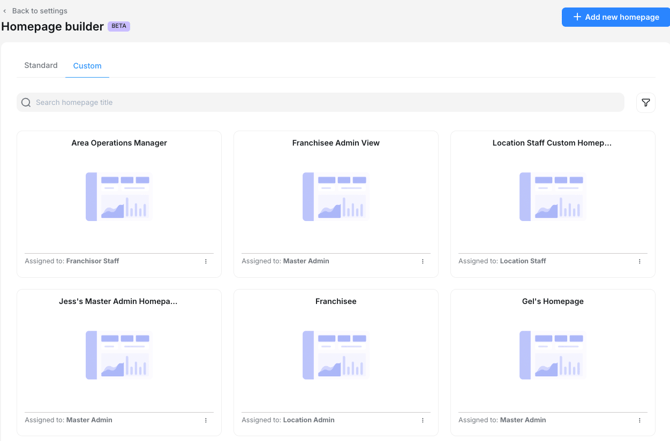
🔧 Key Capabilities You Can Use
-
Build layouts using drag-and-drop widgets
-
Assign layouts by job role or individual user
-
Prioritize what appears at the top of the homepage
-
Remove modules your users don’t need
-
Resize and arrange widgets based on importance
-
Automatically respect existing role-based permissions
📚 Widgets You Can Add
Widgets pull live data from:
-
Tasks
-
Trainings
-
Checklists
-
Compliance
-
Chats
-
Knowledge Base
Your users will only see data they already have permission to view — no extra configuration needed.
How This Impacts Your Organization
Your team will now land on a homepage that actually reflects their job.
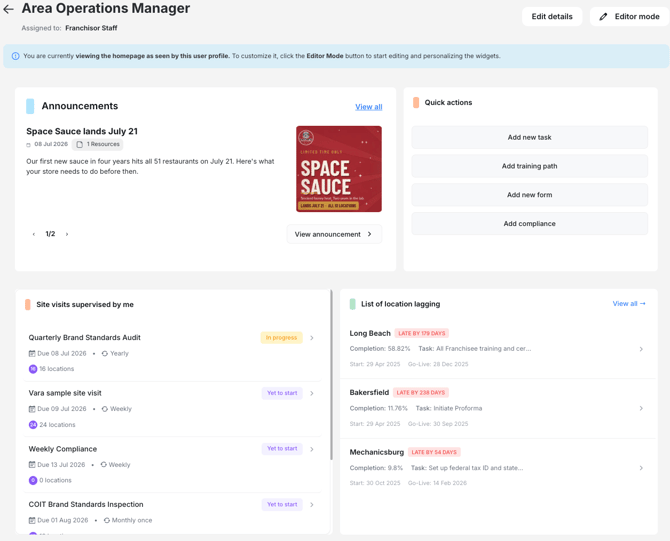
Frontline staff:
They immediately see:
-
Today’s tasks
-
Required trainings
-
Assigned checklists
-
Announcements from leadership
Franchise owners or operators:
Their homepage can highlight:
-
Compliance deadlines
-
Training completion rates
-
Approval queues
-
Location KPIs
Corporate operations or training:
You can surface:
-
System-wide KPIs
-
Brand compliance
-
Rollout progress
-
Recently updated procedures or resources
This turns the homepage into a role-based control center that improves engagement, reduces navigation time, and increases adoption across modules you want your system to use more consistently.
What You Need to Do to Prepare
You only need to take action if you want to customize the homepage.
If you do nothing, your users will keep the existing default.
If you do want to use the builder, follow these steps:
Step 1: Identify the Roles in Your System
Ask yourself:
-
Which roles need a different starting point?
-
What does each group need to see first?
-
Where does confusion or wasted time usually happen?
Think about roles such as:
-
Frontline staff
-
Shift leads
-
Location managers
-
Franchise owners
-
Corporate ops
-
Training & compliance
-
Field teams
Step 2: Go to Settings > Homepages to Create or Duplicate a Layout
Inside the Homepage Builder, you can:
-
Start from scratch
-
Or duplicate the default layout and make edits
Start simple — you can refine layouts anytime.
Step 3: Add, Remove, and Arrange Widgets
Use the widget library to:
-
Add relevant widgets
-
Remove anything unused
-
Resize widgets
-
Reorder items so the most important information appears at the top
Remember: all widgets automatically respect user permissions.
Step 4: Assign the Layout
Assign layouts by:
✔ Job Level (recommended)
-
Go into 'User Roles' under Settings and assign the correct homepage.
✔ Individual User (for exceptions or pilots)
-
Go into the user's profile and assign the correct homepage.
Users will automatically see the new homepage the next time they log in — no action required from them.
How This Affects Your Workflows
Nothing changes unless you choose to configure a custom homepage.
If you take no action:
-
Users will continue seeing the default homepage
-
All workflows remain the same
-
No training or rollout is required
If you customize homepages:
-
Users can complete more actions directly from the homepage
-
Navigation becomes simpler and faster
-
Module adoption typically increases
-
Corporate can guide users toward higher-priority actions
You can roll out homepage updates gradually — role by role or team by team. There is no disruption to existing processes.
Communication Guidance
Internal Message (simple way to communicate to franchisees)
“We’re updating the homepage so you’ll see the most relevant tasks, trainings, and actions the moment you log in. This will make daily work faster and more intuitive.”
Need Help Designing Your Homepages?
Our team can help you decide:
-
Which widgets fit which roles
-
How to structure your layouts
-
How to roll this out gradually to your system