![logo flat.png]](https://8332146.hs-sites.com/hs-fs/hubfs/logo%20flat.png?height=40&name=logo%20flat.png)
Everything you need to know about reaching Delightree Support
How to reach support
You can start a conversation with our team from anywhere in your Delightree account in just two steps:
- Log in your Delightree account.
- Click the question mark icon in the top right corner of the screen.
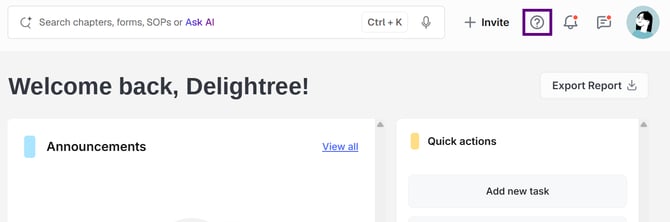
Ask a question or open a ticket
Once the chat window opens in the bottom right, you have two options:
- AI chat — Ask your question in the AI chat for an instant answer. If it can't resolve your issue, a team member automatically takes over — no need to start a new request.
- Create a ticket directly — Skip straight to a support ticket if you are requesting a task or for us to investigate a bug.
All responses and updates appear right in the support window, and we'll also email you so you never miss a reply.
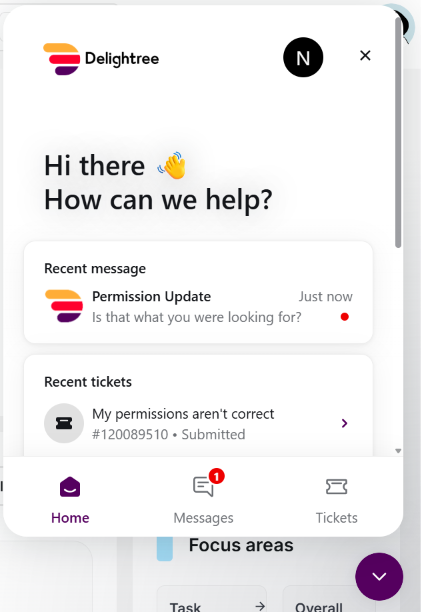
The in-app support window: ask the AI chat or create a ticket.
Track your tickets
To check on an existing request, open the support window and click “Tickets.” You'll see the status of every request you've submitted, along with the full conversation history.
What happens to your existing tickets?
Any tickets that were open in the previous support portal have been migrated automatically. Your open issues stay open, and our team continues working on them without interruption — you don't need to resubmit anything. You'll find them under “Tickets” in the new in-app support window.
Frequently asked questions
Do I need a new login?
No. In-app support lives inside your existing Delightree account — there's nothing new to sign up for.
Is the old support portal still available?
No. The external support portal closed on August 3. All new requests should go through in-app support from now on.
Will I still get email updates?
Yes. Every response and status update is posted in the support window and sent to your email, so you can reply from whichever is more convenient.
What if the AI chat can't answer my question?
A member of our support team automatically steps in to make sure you get the help you need, you won't need to start over or submit a separate ticket.
Need help right now? Log in to Delightree and click the question mark icon in the top right corner to reach our team.